This page documents how recipients consent to receive text messages under SquareKeeper's fleet SMS program, “SquareKeeper Fleet.” It describes the two opt-in methods used by waste-collection service offices — a verbal consent script and a personal web consent form — the enrollment confirmation, and the full program disclosures, and is published as a public reference for recipients, service offices, and messaging carriers.
Who receives these messages
Recipients are designated contacts — property managers, facilities staff, and similar personnel — at commercial properties served by waste-collection operations that use SquareKeeper Fleet. Messages are service notifications: for example, a text when a scheduled pickup at the contact's property is completed, or when only part of it could be completed (such as a blocked container). SquareKeeper does not send marketing, advertising, or promotional messages, and mobile numbers are never sold, rented, or shared with third parties for their marketing purposes.
How consent is collected
Consent is always collected before any message is sent, and enforcement is built into the product:
- A property contact requests service notifications from the office that manages their waste service.
- The contact gives affirmative consent one of two ways: verbally, when office staff read the consent script reproduced below and record the contact's agreement in SquareKeeper (the recording step requires the office to attest that consent was actually given — the attestation is also reproduced below); or through the web consent form, when the office emails the contact a personal, single-use consent link (valid for 7 days) and the contact opens their own link, enters their own mobile number, and actively checks an unchecked consent box on the page reproduced below. Web-form consent records server-side at the moment the contact submits the form.
- A mobile number may be stored without SMS consent — such contacts receive email only. The system enforces this: no text can be sent to any number until the consent event is recorded.
- When consent is recorded, the number's first message is an enrollment confirmation that identifies the service and includes opt-out instructions (reproduced below).
- Replying STOP ends all texts immediately at the carrier level — office staff cannot override a STOP, and the consent page itself refuses to record new consent for any contact with a STOP on file. Replying HELP returns support information.
SMS consent is voluntary and is not a condition of any purchase or service — the same notifications are also available by email.
Verbal opt-in — the consent script
When consent is collected verbally (in person or by phone), office staff use this script:
Only an explicit “yes” proceeds. The office then records the consent event in SquareKeeper (the attestation below), and the number's first message is the enrollment confirmation shown at the bottom of this page.
Web form opt-in — the personal consent link
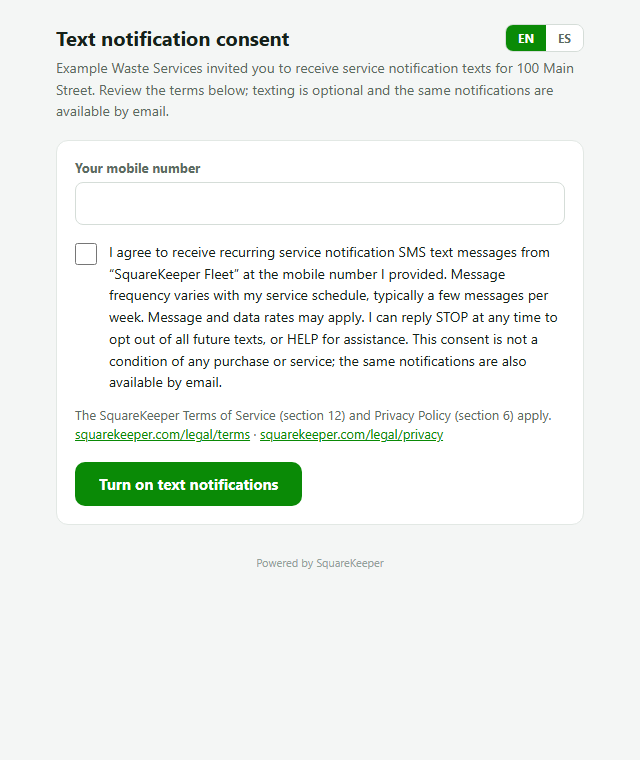
When consent is collected through the web form, the office emails the contact a personal, single-use consent link, valid for 7 days, bound to that one contact. The link opens a consent page where the contact enters their own mobile number and actively checks the consent box — the box is unchecked by default; the page will not record consent without it. Submitting the form records the consent event server-side at that moment, and the link cannot be used again. If a STOP request is already on file for the contact, the page refuses to record consent and says so. The consent statement on the page reads, in the contact's choice of English or Spanish:
The SquareKeeper Terms of Service (§12) and Privacy Policy (§6) are linked directly beside the consent box on the page.
Hosted opt-in evidence
Screenshots of the consent page exactly as a contact receives it — the consent box unchecked by default; the contact must actively check it before submitting. In English:
And in Spanish:
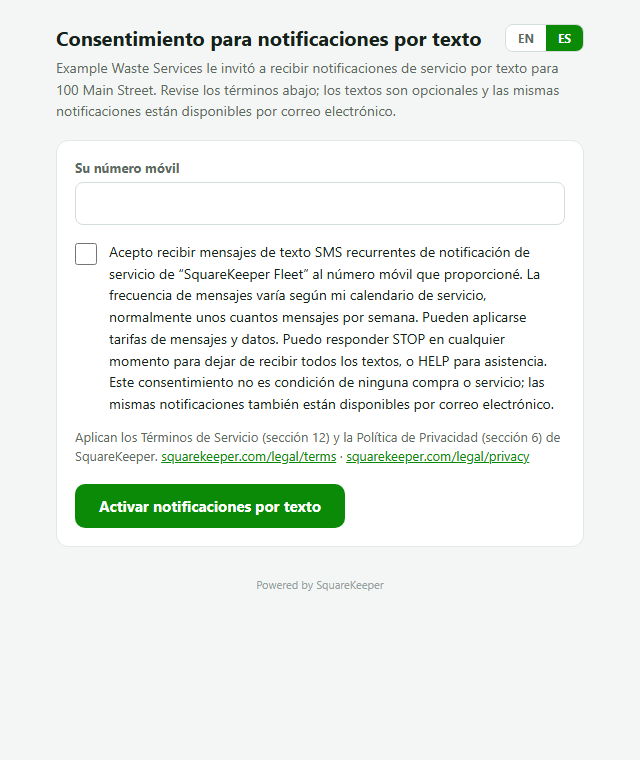
The verbal script is reproduced above in full; the recorded consent event (date, method, and who or what recorded it — the office staff member for verbal consent, the contact's own form submission for web-form consent) is stored in SquareKeeper and enforced before any text is sent.
Program disclosures
- Program name: SquareKeeper Fleet.
- Message frequency: varies with service schedules — typically a few messages per week per property.
- Cost: message and data rates may apply. SquareKeeper does not charge recipients for receiving notifications.
- Opt out: reply STOP to any message to end all future notifications.
- Help: reply HELP, or email hello@squarekeeper.com.
- Privacy: mobile numbers are used only to deliver these notifications and are not shared with third parties for marketing — see the Privacy Policy §6.
- Terms: see the Terms of Service §12 (“SMS Alerts Programs”).
The consent attestation
When consent is collected verbally, the office records it in SquareKeeper before the number can be texted (web-form consent records itself when the contact submits their form). The recording step presents this attestation, exactly as it appears in the application:
The enrollment confirmation
The first message a newly consented number receives:
Questions about this program? Email hello@squarekeeper.com.